What the official crosswalk actually is
The thing people call the military skills translator has a real, federal backbone: the MOC crosswalk produced by the Defense Manpower Data Center (DMDC). The Department of Labor's O*NET Resource Center builds its military search on it. Each row takes a service occupation code — an MOS, a rating, an AFSC, a designator — and records the occupations it links to, as O*NET-SOC codes.
The file's own field list shows the shape. Every row carries a service branch (SVC), a personnel category (MPC: enlisted, warrant officer, commissioned officer, or a dash for civilian codes), the occupation code and title (MOC, MOC_TITLE), a status, and up to four O*NET-SOC codes in the columns ONET1 through ONET4, each with its title.
O*NET's military search starts from that file and then adds to it. Its crosswalks page lists the supplements: an enhanced analysis for key military occupations commissioned by DOL with DoD under Section 222 of the VOW to Hire Heroes Act; a RAND report on the knowledge, skills and abilities behind “ten of the largest Army military occupational specialties (MOSs)”; the branch DoD COOL sites; the ASVAB Career Exploration Program; and Careers in the Military. O*NET also says plainly that the work is not finished: “The linkages in this crosswalk are currently being updated using a combination of statistical modeling and task analysis approaches.”
O*NET publishes its resources under a Creative Commons Attribution 4.0 International license — an attribution license, which is why WheelsUp credits the data on the page wherever it appears.
What a match means — and what it does not
The catch is in the method. DoD's COOL portal describes it in one sentence: “The O*NET linkages are based on a comparison of job duties performed in the military, the civil service, and the civilian sector (industry).”
A match is a statement about duties, not about you. It says the tasks in two occupations overlap. It does not say you hold the license the civilian job requires, that an employer will count your service as experience, or that anyone is hiring. The federal tools say as much themselves — My Next Move for Veterans prints, with its results: “These careers may require additional training, education, or experience.”
For some codes, O*NET goes one step further and sorts the civilian careers into two bands:
- “Tasks in these careers match most duties of the military job”
- “Tasks in these careers match some duties of the military job or a specialty”
Read those bands for what they are. Most duties is a closer overlap than some duties; neither is a promise that the career is open to you on the day you separate.
Three habits make the mapping useful rather than misleading:
- Read the occupation description, not just the title. Titles are short and generic; O*NET's description tells you what the job involves day to day.
- Look for what stands in between. Many civilian occupations sit behind a license, a certificate or a degree. Our certifications guide covers how to check those.
- Treat the list as a starting set. The crosswalk is a similarity mapping. It is a good way to find occupations you had not considered, and a poor way to rule any out.
Why your branch matters as much as your code
A code only means something inside its own service. COOL's legend says it directly: “Each Service has a different coding system for Officer, Warrant Officer and Enlisted personnel categories.” Its table names them:
| Service | Enlisted | Warrant officer | Officer |
|---|---|---|---|
| Army | MOS | WOMOS | AOC |
| Navy | Rating | CWO | Designator |
| Marine Corps | MOS | MOS | MOS |
| Coast Guard | Rating | CWO | OSC |
| Air Force | AFSC | — | — |
(COOL's table lists only the enlisted AFSC row for the Air Force.) The crosswalk's own branch field is wider still. It has twenty values: besides the service occupation codes, it carries things like Army additional skill identifiers, Air Force and Space Force prefix codes and special experience identifiers, Navy officer subspecialty codes, DoD occupational conversion codes and OPM civil-service series. Many of those modify a job rather than name one, so a lookup has to know which kind of code it is holding.
Space Force is the case that surprises people. DoD's COOL page states: “Space Force occupations are currently listed with Air Force occupations.” So when a Guardian looks up a code, the answer may come from the Air Force list — that is DoD's published position, not a data error.
Personnel category matters too. The file records a personnel category on every row — enlisted, warrant officer or commissioned officer for service codes, and a dash for civilian ones — so a code is only fully identified by service, category and code together. Search with the category you actually hold.
Retired codes and military-only codes
Two situations look like a failed search and are not.
Your code has been retired. The crosswalk tracks status on every row: A for an active record, O for an “Obsolete (rescinded) record”, and two further values for an added or an obsolete code with a future effective date, plus the start and end dates of active status. Codes are rescinded over time, so a member separating today may have spent years under one that is no longer active. O*NET has a sentence for exactly this — “Your search matched an Air Force AFSC code that is no longer in active use” — and a retired code is not the same thing as an uncovered one.
Your code maps only to military occupations. For some codes, every occupation the crosswalk records is one that exists only in the armed forces. The Career Translator marks each such occupation; where the Section 222 analysis covers the code (Army 11B is one), it shows that analysis's civilian careers, and where nothing covers it, it says there is no civilian match on record rather than showing an empty list. That is a fact about the file, not a verdict that your skills do not transfer — it means the transferable part has to be described in your own words, from your duties, rather than looked up.
Beyond the first answer
The crosswalk's four ONET columns are a ceiling, not a guarantee — a row may fill fewer of them. The supplements O*NET names are there to widen that answer, and a tool that shows you only the first match, or silently caps a long list, is leaving information on the table.
COOL is the other route in, and it works in both directions. Its Related Civilian Occupations tab starts from a civilian job: for each O*NET occupation it shows Related MOCs — military occupations related to it by similarity of tasks — and related credentials, with flags for Bright Outlook and for a registered apprenticeship. Start from a civilian job you want, and COOL will show you which military codes DoD links to it.
WheelsUp's timeline back-plans your separation from your actual date — SkillBridge, relocation PTDY and terminal leave on one chart — so the career research in this guide happens while you still have time to act on it.
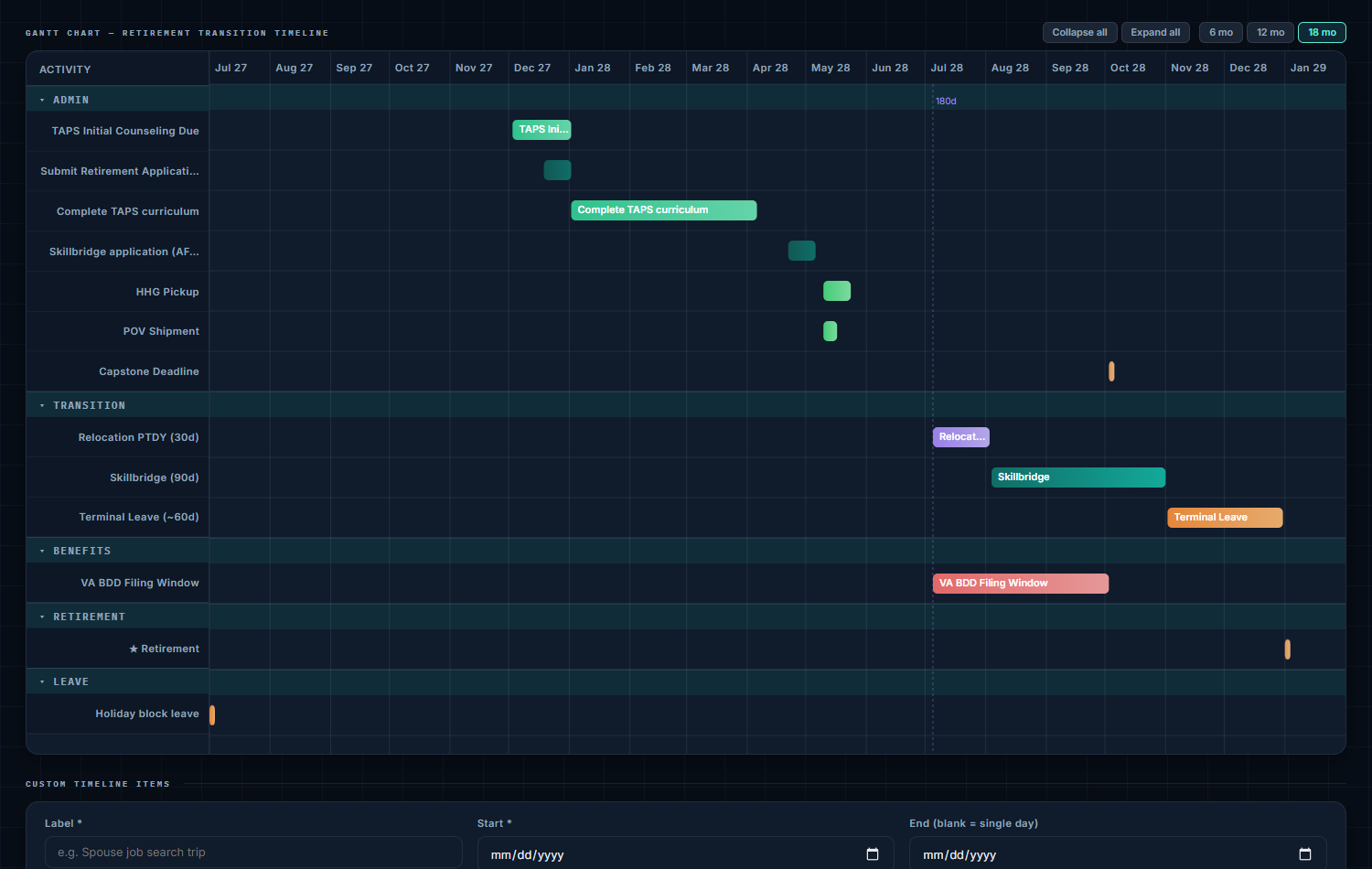
What the WheelsUp Career Translator does with this data
The Career Translator is a Pro tool. It is built directly from the federal data files, and it is deliberately explicit about which parts are federal data and which are ours:
- You choose your branch, then type your code — or part of the job title. It defaults to the branch on your profile, and asks rather than guesses, because some codes (its examples are ET, OS and IT) exist in more than one service. Air Force and Space Force codes work in either the broad X form or a skill-level form, because the digit in the fourth position is a skill level rather than part of the specialty.
- It shows the federal file's own answer first — every occupation the crosswalk records for the code, military ones included — and then the closest civilian careers: up to five, with O*NET's description of each.
- It says where each list came from and how it is ordered — the crosswalk's own order, O*NET's Related Occupations ranking, or the Section 222 analysis's linkage bands, where it records them alongside a job-preparation band (and, in the full Section 222 list, a pay grade). When the Section 222 analysis lists more careers than the five shown, it states the full count and lets you open the list.
- It handles the awkward cases out loud: a retired code is answered and labeled; a code that maps only to military occupations says so; a code it does not hold yet says how many codes for your branch it does hold; a code that names different jobs for different personnel categories uses the pay grade on your profile to pick, and asks you when the jobs differ and your profile does not settle it.
- Space Force lookups can reach the Air Force list, as DoD publishes them, and the page states when that is where the answer came from.
- Our opinion is fenced off. Where we have written one, a dated WheelsUp view paragraph says how far the mapping really carries and what usually stands between you and those careers. It is labeled as our editorial and never mixed into the cited cards.
- Certifications and SkillBridge programs are listed under the careers from CareerOneStop and DoD's own directory, with the release each came from on the page.
It does not model wages, hiring demand or your personal qualification for anything, and it does not rank employers.
The short checklist
- Search with your branch and personnel category, not just the code.
- If the code is retired, use it anyway for research — and lead with the job title on your résumé, since a recruiter searching current codes will not find it.
- Read each occupation's description and list the duties you actually performed that match it.
- Find the gate for each target career — license, certification, degree or apprenticeship — before you commit to one.
- Run COOL in reverse from a civilian job you want, to see which military codes DoD links to it.
- Put the research on a calendar with enough runway for SkillBridge or credentialing before your date.
Sources
- Defense Manpower Data Center, Military Crosswalk Field Descriptions (the Read Me for the MOC crosswalk distributed by O*NET) — SVC service-branch values, MPC personnel categories, MOC and MOC_TITLE, STATUS values A/O/1/2, SDATE/EDATE, SOC1–4 and ONET1–4
- O*NET Resource Center, Crosswalks page, O*NET Military Transition Search — the DMDC crosswalk and its supplements (the Section 222 VOW to Hire Heroes Act enhanced analysis, the RAND Army KSA report, DoD COOL, ASVAB CEP, Careers in the Military); the statement that linkages are being updated; the CC BY 4.0 license statement
- My Next Move for Veterans, military search results — the two linkage-band headings, the retired-AFSC notice and the additional-training caveat, as rendered
- DoD COOL, Research Military Occupations — the Space Force listing note, the O*NET duty-comparison description, the MOC coding table by service and personnel category, and the Related MOCs, Bright Outlook and apprenticeship legend entries
Spot an error? Tell us — citations are the product here.
Your code, the federal answer, and what stands in between. WheelsUp puts your transition dates in one plan, and Pro adds the crosswalk and the certifications — with the source on every line.