A listing is not a slot
The catch with DoD's SkillBridge directory is what it is not: it is not a list of openings, and finding a program you like is the first step of a process that runs through your command, not the end of one.
DoDI 1322.29 sets the frame. Participation is self-initiated, and it is reviewed and authorized by the first field grade commander in your chain who can impose non-judicial punishment — an authority that may not be delegated. And: “The approval authority may terminate the participation of a Service member in a program based on mission requirements.”
Three more lines from the same instruction shape how you read any listing:
- Eligibility is time-boxed. You must have completed at least 180 continuous days on active duty and be expected to be discharged or released within 180 days of starting.
- No pay from the provider. “Participating Service members are not eligible to receive from the JTEST-AI provider wages, training stipends, or any other form of financial compensation” for the time spent in the program. Enrollment must be at no or minimal cost — application and registration fees are the instruction's examples.
- No guaranteed job. For internships, one of the six required criteria reads: “The intern is not necessarily entitled to a job at the conclusion of the internship.”
Eligibility, PTDY and how the 180 days fit around terminal leave are covered in our complete SkillBridge guide. This page is about reading the list.
What each field in a listing tells you
Each program record DoD's directory serves carries seven fields, in this order: id, active, name, orgName, industry, occupation and servicesSupported. That is the whole record.
| Field | What it holds | How to read it |
|---|---|---|
| active | true or false | The directory keeps inactive records. An inactive program is not one you can join — filter them out first. |
| name | The program's name | Sometimes a job title, sometimes a training name, and sometimes just the organization's name again. It rarely tells you the schedule or the work. |
| orgName | The organization | Companies, federal agencies, colleges and training providers all appear. The organization is who you contact. |
| industry | A group label | Despite its name, the values are occupational groups — Computer and Mathematical, Protective Service, even Military Specific and Not Selected. Do not read it as the employer's industry. |
| occupation | An occupation title | The occupation the listing was filed under, or Not Selected. It describes the training placement, not a promise of a job in that occupation. |
| services | Branch names, comma-joined | Which services may apply — and the field most likely to mislead a filter. See the next section. |
What is not in the record: no location, no start or end dates, no duration, no delivery method, no application window, no point of contact, and nothing that says how many members a program takes or whether the organization is hiring. Those are questions for the organization and for your service's SkillBridge office. DoDI 1322.29's own metric elements include Program Location, Program Dates and the share of members receiving a job offer after completion — none of which the directory record publishes.
And DoD does not rank the list. The instruction directs the Military Departments to help identify and document training opportunities through a fair and equitable process that “avoids any appearance of endorsement, preferential treatment, or conflict of interest”. Any top programs list you find elsewhere is someone else's opinion.
The branch-filter trap
The servicesSupported field is free-form. The values in the file include:
- All Services — on its own, or mixed with branch names (All Services, Army).
- Lists of branches in no fixed order (Navy, Marine Corps, Coast Guard, Army, Air Force).
- Duplicates (Air Force, Air Force) and a form that starts with stray commas.
- An empty value — no branch at all.
The trap: if you filter for your branch name alone, you drop every program marked All Services and still see a list that looks complete. On a site that offers a branch filter, check whether it includes All Services listings before you conclude there is nothing for you.
The empty value is the other judgment call. The record does not say what a blank means, so ask the organization whether your service is eligible before you build a plan around it.
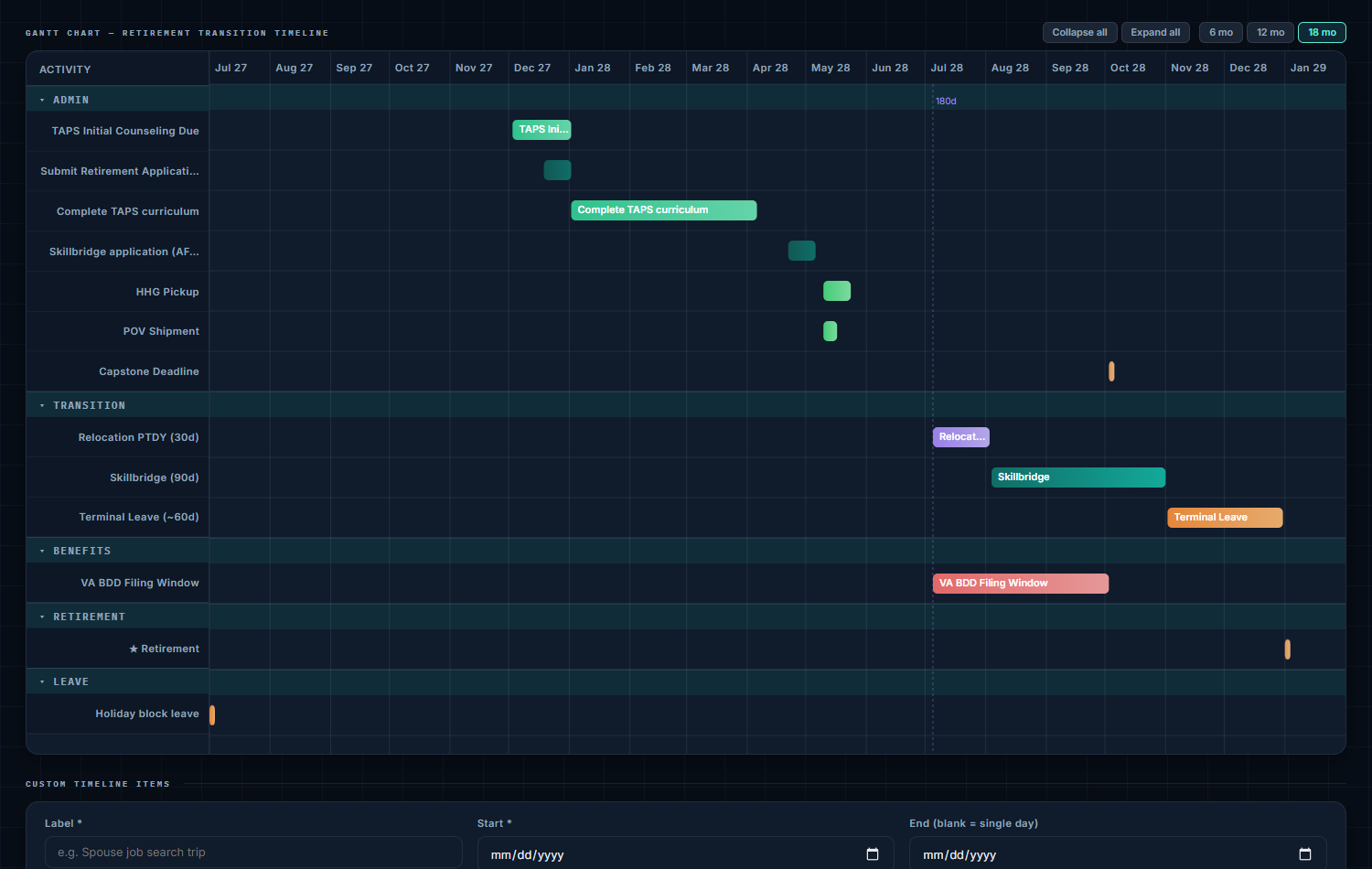
WheelsUp's timeline puts SkillBridge, relocation PTDY and terminal leave on one chart, back-planned from your separation date — so you can see how much of your window a program will take before you apply for it.
Your rank sets the length — and each service sets its own
DoDI 1322.29 sets no rank-based length. The caps come from each service, and they differ. The Air Force instruction states the outer limit plainly: even an approved exception to policy may exceed its rank table, but “Program cannot exceed 180 days.”
| Service (source) | Program length by grade |
|---|---|
| Army (AR 600-81, Table 5-1) | Enlisted: E1–E5 up to 120 days; E6–E7 up to 90; E8–E9 up to 60. Warrant officers: WO1–CW3 up to 90; CW4–CW5 up to 60. Officers: O1–O3 up to 90; O4 and above up to 60. |
| Navy (NAVADMIN 064/23, para 4) | Enlisted: E5 and below, 180 days or less; E6–E9, 120 or less. Warrant officers: 120 days (SkillBridge office rank table). Officers: O4 and below, 120 or less; O5 and above, 90 or less. |
| Marine Corps (MARADMIN 280/24, para 3.a) | Enlisted: E1–E5 up to 120 days; E6–E7 up to 90; E8–E9 up to 90. Warrant officers: WO–CWO3 up to 90; CWO4–CWO5 up to 90. Officers: O1–O4 up to 90; O5 and above up to 90. |
| Air Force (AFI 36-2671, Table 1) | Enlisted: E-1–E-5, 120 days max; E-6–E-7, 90; E-8–E-9, 60. Warrant officers: WO-1–CW-O3, 90; CW-O4–CW-O5, 60. Officers: O-1–O-3, 120; O-4, 90; O-5, 60; O-6 by exception to policy only. |
| Space Force (SPFI 36-2672, Table 1) | Enlisted: E-1–E-5, 120 max; E-6–E-8, 120; E-9, 90. Warrant officers: not applicable. Officers: O-1–O-4, 120 max; O-5 and above, 90. |
| Coast Guard (SkillBridge office rank table) | No service-specific rank restrictions; participation up to 180 days within the member's last 180 days of active duty. |
Three details that change the arithmetic:
- Navy days include everything. The SkillBridge office's rank table footnotes the Navy column: “Number of days listed is inclusive of PTDY, Terminal Leave, and SkillBridge”. NAVADMIN 064/23 adds that “SkillBridge must occur prior to any terminal leave or permissive temporary duty associated with separation, fleet reserve, or retirement.” and describes its limits as the maximum time before your separation, fleet reserve or retirement date that participation can begin.
- Marine Corps absences are combined. MARADMIN 280/24 authorizes leave and permissive TAD with SkillBridge, but “the combined period of absence from duties must fall within the three category timeline/duration limits”, and all PTAD must come before any leave.
- Air Force O-6s start ineligible. AFI 36-2671 names O-6 as ineligible by rank; an exception to policy can be requested, with coordination through the senior leader management office before the approval authority.
Most of these tables also move the approval authority up with rank, so check who signs for your grade. The Coast Guard row in that table begins “No Service-specific policy rank restrictions incorporated” — the 180-day DoD window is the limit there.
HIRE Vets Medallion: one employer signal, not a hiring promise
The Department of Labor describes the award in one sentence: “The HIRE Vets Medallion Award is the only federal-level veterans’ employment award that recognizes a company or organization’s commitment to veteran hiring, retention, and professional development.”
That is what it measures — an organization's commitment, recognized for a given year. It is a reasonable thing to weigh when two SkillBridge programs look similar. It is not a statement that the employer is hiring, is hiring near you, or would hire you.
What the published awardee file actually contains:
- Seven columns: Name, DBA, City, State, Size, Award Type and Award Year. There is no occupation, job title or industry column, so the list cannot be matched to your career.
- One year. The file WheelsUp holds lists 888 employers, every one with Award Year 2025 — it is that year's cohort, not a register of every employer that has ever held the award.
- Two award types and three sizes: Gold (562 in the file) and Platinum (326); Small (387), Medium (406) and Large (95), on the file's own three-value scale.
Use it the way it is built: as a check on an employer you have already found through a SkillBridge listing or a job posting, not as a job board.
What WheelsUp shows
The Career Translator (a Pro tool) takes your military code to its closest civilian careers and then, for each career, lists the SkillBridge programs DoD files under that occupation:
- Filtered to your branch correctly — it counts listings that name your service, listings marked All Services, and listings that name no service — and it states the total, not just the few it previews.
- Alphabetical by organization, with a line saying DoD publishes no ranking and the page adds none.
- The occupation is DoD's own field, not a WheelsUp inference, and the page says so; it sends you to DoD's SkillBridge directory for eligibility, dates and how to apply.
- HIRE Vets appears as counts only — how many 2025 awardees there are, by tier — and is never filtered by your career, because the file has no column to filter on.
For finding the career first, see our crosswalk guide.
The short checklist
- Find your service's cap for your grade in the table above, and confirm it against your service's current guidance.
- Search active listings only, and include All Services listings in any branch filter.
- Shortlist by occupation, then read past the name field — contact the organization for location, dates, schedule and what the placement involves.
- Ask about cost — enrollment must be at no or minimal cost — and confirm you will take no pay from the provider.
- Check the employer against the HIRE Vets list if it matters to you, knowing what the award does and does not measure.
- Take it to your approval authority early, with your dates laid out, and have a fallback if the answer is no.
Sources
- DoD SkillBridge program directory, Programs endpoint response retrieved 2026-09-05 — record fields; every industry value; every servicesSupported value; sample records
- U.S. Department of Labor, VETS, HIRE Vets Medallion Award — the program description from hirevets.gov; the awardee export header row and data rows (Award Year 2025)
- DoDI 1322.29, JTEST-AI (Change 1) — para 3.b–3.c and 3.f (eligibility, approval authority, termination, extension); Encl. 2 para 4.d (fair and equitable process, no appearance of endorsement); Encl. 3 paras 1–2; Encl. 4 paras 1.a and 1.c (no or minimal cost; no provider compensation) and 3.a(5); Encl. 5 metric elements
- DoD SkillBridge program office, Service-Specific Policy Rank Restrictions — Navy warrant officer row and footnote 1; Coast Guard row
- AFI 36-2671 (31 March 2026) — Table 1; paras 7.4 (O-6 exceptions) and 7.5.1 (180-day limit)
- SPFI 36-2672 (31 March 2026) — Table 1
- AR 600-81 (25 March 2026, effective 25 April 2026) — para 5-4 (the 120-day ceiling) and 5-4c(1)(e), Table 5-1
- NAVADMIN 064/23 — para 4 (paygrade tiers; SkillBridge before terminal leave and PTDY)
- MARADMIN 280/24 (interim guidance, signed 17 June 2024) — paras 3.a (categories) and 3.b (combined absence)
Spot an error? Tell us — citations are the product here.
The program is only half the plan. WheelsUp back-plans SkillBridge, PTDY and terminal leave from your actual date and branch, so the window you apply for is the window you have.